Every technician needs a tool, so the saying goes. However, these days every person has a set of gadgets that are essential parts of their lives.
Key Takeaways
- Hardware quality directly affects your productivity as a remote worker — invest in a machine that will not slow you down or fail unexpectedly.
- A reliable laptop is the anchor of any remote work setup; mobile devices complement it but do not replace it for serious work.
- The software layer — communication tools, task managers, cloud storage — is equally important as hardware and often free or low-cost.
- Ergonomics matter: poor equipment leads to physical strain that compounds over months of remote work.
- Test your setup before you rely on it professionally — find and fix problems before an important client call, not during one.
Even if you are working remotely, you need some tools for efficiently processing your job. In this modern era, you can easily stay on top of your communications, emails, and tasks through the right combination of devices and applications.
The three categories below represent the hardware foundation that remote workers have consistently relied upon: a smart pen for note-taking, a powerful laptop as your primary workstation, and a capable smartphone for communication on the go.
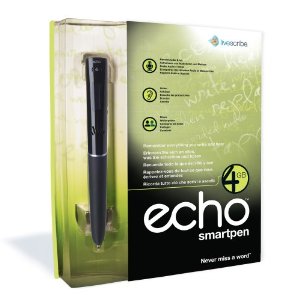
Live Scribe Smart Pen — For remote workers who attend client calls or team meetings, a smart pen that syncs handwritten notes to digital devices can significantly reduce the time spent on post-meeting documentation. Writing by hand during a meeting keeps you engaged without the screen-barrier effect of typing, and modern smart pens capture both the written notes and linked audio for review later.
Apple MacBook Pro — A high-performance laptop with fast restart times, strong battery life, and a reliable operating system is the core of any serious remote work setup. MacBook Pros are widely used across creative, technical, and professional fields for their build quality, display, and longevity. A machine that starts quickly, handles multiple applications simultaneously, and does not require frequent maintenance pays for itself in time saved over two to three years of use.
Smartphone (Android or iOS) — A capable smartphone handles communication, scheduling, two-factor authentication, and quick reference tasks when away from the primary workstation. Modern smartphones with multi-core processors and comprehensive app ecosystems handle the day-to-day coordination tasks of remote work effectively.
The Software Layer: Tools That Matter More Than Hardware
Hardware is the foundation, but software and services determine day-to-day effectiveness for most remote workers. Here are the categories that make the biggest difference.
Communication and video conferencing. Zoom, Google Meet, and Microsoft Teams have become standard. More important than which platform you use is how you use it: invest in a quality external microphone (a $50 USB microphone dramatically improves call audio compared to a built-in laptop mic), position your camera at eye level rather than looking down, and ensure you have adequate lighting in front of you, not behind. Poor audio is the single most disruptive element in remote meetings.
Asynchronous communication tools. Slack, Microsoft Teams (for messaging), and Loom (for asynchronous video messages) allow remote teams to communicate without requiring everyone to be available simultaneously. Mastering asynchronous communication — writing clear, self-contained messages that do not require immediate follow-up — is one of the most valuable skills a remote worker can develop.
Task and project management. Notion, Asana, Trello, and ClickUp all serve the function of externalising your task list and project status so that teammates can see what you are working on without needing to ask. Choosing one and using it consistently is more important than which specific tool you pick.
Cloud storage and document collaboration. Google Drive and Microsoft OneDrive ensure your work is accessible from any device and never lost to a hardware failure. Google Docs, Sheets, and Slides allow simultaneous collaborative editing in real time, which eliminates the version control chaos of emailing document attachments.
Time tracking and focus tools. Toggl or Harvest help freelance and contract remote workers track billable time accurately. RescueTime or Freedom help identify and manage digital distraction during work hours. Even employed remote workers benefit from time-tracking as a self-management tool — it reveals exactly where your hours go, which is the first step toward improving how they are spent.
Setting Up Your Remote Work Tech Stack
The goal of a remote work tech stack is not to have every possible tool — it is to have the minimum set of tools that eliminates friction in communication, coordination, and output. Over-tooling is a genuine risk: context-switching between too many applications reduces productivity and increases cognitive load.
A minimal but effective remote work setup:
- Hardware: Laptop + smartphone + quality headset
- Internet: Stable broadband with a wired ethernet option for critical calls
- Communication: One video platform + one messaging platform
- Tasks: One task manager used consistently
- Storage: One cloud storage platform where all work documents live
- Focus: One website blocker for protected focus periods
Start with this foundation, and only add tools when a specific pain point makes it clear that something additional is needed.
For guidance on whether working from home is right for you, see: Are You Ready to Work From Home?
Frequently Asked Questions
What tools do remote workers need to be productive?
The essentials are a reliable laptop or desktop computer, a stable high-speed internet connection, and a quality headset or microphone for video calls. Beyond hardware, the most impactful tools are a good task management app, a video conferencing platform, and a team communication tool like Slack.
What is the best laptop for remote work?
The best laptop for remote work balances performance, battery life, and portability. The Apple MacBook Pro and MacBook Air are popular choices for their build quality and battery life. For Windows users, the Dell XPS 13, Lenovo ThinkPad X1 Carbon, and Microsoft Surface Pro are well-regarded remote work machines.
What software tools are essential for remote workers?
The core software stack for most remote workers includes a video conferencing tool (Zoom, Google Meet, or Microsoft Teams), a team messaging app (Slack or Microsoft Teams), cloud storage (Google Drive or Dropbox), and a task or project management tool (Notion, Asana, or Trello).
How important is internet speed for remote work?
A stable, symmetrical connection is more important than raw speed. For video calls, a minimum of 10 Mbps upload and download is recommended. For teams using cloud-based tools extensively, 25 Mbps or more is preferable. A wired ethernet connection is significantly more reliable than WiFi for important video meetings.
Are noise-cancelling headphones worth it for remote work?
Yes — particularly for anyone who works in a noisy environment or takes frequent video calls. Active noise-cancelling headphones reduce background noise and improve audio quality for both the wearer and call participants. The Sony WH-1000XM series and Bose QuietComfort range are consistently rated the best for work use.
Get 50 Interview Questions + Expert Answers — Free
Join thousands of job seekers who've used our free guide to land more interviews.
Next step for your job search
Pick one guide and keep momentum.
Jobiety Editorial Team
Our editorial team researches and tests every piece of career advice we publish. We draw on real hiring data, interviews with recruiters, and hands-on experience to give you guidance that works.